ARTIFACT / 01Sample briefing
briefing / UA599 KIAD → KDEN
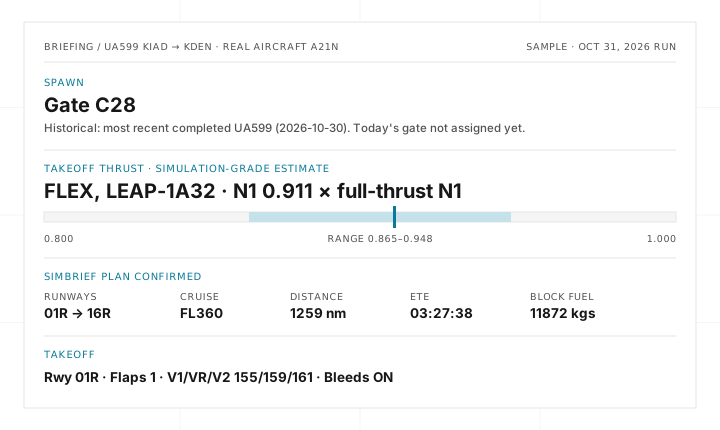
MEDIA PREVIEWStill image / Recorded sample
WAY / Flight dispatcher MCP server
OPEN SOURCE / SELF-HOSTED / MCP SERVER
Tell Waycrew the flight you want to fly and it finds a real airline schedule, waits for your approval, then generates your SimBrief plan. Every briefing starts with where to spawn and a simulation-grade takeoff N1 target with its range.
Run it on your own keys.
For flight simulation only. Never use any output of this project for real-world flight planning or aircraft operation. Waycrew does not connect to or control the simulator.
STATIC SAMPLE / NO NETWORK CALLS
A local walk-through of the approval gate and the briefing it unlocks. The briefing values come from a live end-to-end run on October 31, 2026; the approval layout is illustrative. Nothing here contacts FlightAware, SimBrief, Browserbase or a model.
Approving lets the agent fill SimBrief's dispatch form in a cloud browser and generate this plan once. Declining generates nothing.
Gate C28
Historical: used by the most recent completed UA599 (2026-10-30, FlightAware). Today's gate is not assigned yet.
FLEX · N1 0.911 × full-thrust N1
LEAP-1A32. An estimate with a range, not verified aircraft data.
Flight: UA599, real aircraft A21N. Departure: sched out 2026-11-01 17:20 EST (2026-11-01T22:20:00Z).
No cloud browser opened and no SimBrief plan was created. You can then ask the agent for a different flight, time or aircraft, which comes back for a new approval.
01 / What it makes easier
The open-source flight dispatcher for Infinite Flight pilots. Describe a flight, approve the exact dispatch, and get a SimBrief plan plus a briefing that starts with where to spawn and the takeoff N1 to set.
It searches live and recent schedules through FlightAware AeroAPI and never invents a flight number. If today's gate isn't assigned yet, it gives the most recent operation's gate and labels it historical.
You see the exact flight, airports, departure time, connection, aircraft and thrust status before a SimBrief plan is generated or a cloud browser opens. Flight research happens first, so AeroAPI requests billed to your key can occur before approval.
After you approve, it fills SimBrief's dispatch form in a Browserbase cloud browser, reads every field back, and clicks Generate once for that approved revision. It never repeats a Generate whose outcome is uncertain.
N1 targets come from SimBrief's takeoff solution and the lapse shape of FlyByWire's open A32NX thrust model. They are simulation-grade estimates; aircraft it can't model get a clear "unavailable" instead of a guess.
Each leg is dispatched and kept separately and must leave at least 45 minutes after the previous leg lands. Numbered revisions are each approved, generated and finalized on their own, and earlier plans are kept.
Ask where a trip stands at any time, even after a server restart. Cancel stops the work at the next safe point and withdraws approvals not yet generated, while finished plans are kept. A Generate click already made is never undone or repeated.
02 / Working model
One agent handles the conversation while fixed tools handle flight lookup, the approval gate, SimBrief generation, plan matching and the thrust estimate. No SimBrief plan is generated until you approve the exact dispatch.
Ask in plain language, like "Dulles to Denver tomorrow evening in the A321neo." The agent looks up real flights and asks about anything it can't settle.
Review the exact dispatch and approve or decline it. Approval gates SimBrief generation; the gate refuses dispatches you shouldn't be asked to approve.
Get the generated SimBrief plan and a briefing that leads with spawn gate and takeoff thrust. It never claims your plan was imported, your aircraft spawned or your thrust was set.
On the production server, a private A20N trip generated KIAD→KEWR and KEWR→KIAD once each, in 39 and 38 browser seconds. A third leg's pending approval was cancelled and then refused; both finished briefings were kept and no browser was left running.
v0.5.1 checks passed with three Postgres-only skips. CI also builds the release image and starts the browser driver inside it, after v0.5.0 shipped a driver that could not run there.
The last two full runs of 100 scripted first messages passed every safety check. These are single runs, not performance statistics.
“Nothing goes to SimBrief until you approve the exact dispatch.”
03 / Product narrative
Waycrew is for pilots who want to fly real-world schedules without assembling them by hand. You describe the flight; it finds a flight that actually operates, asks you to approve the exact dispatch, fills in SimBrief for you, and hands back a briefing that starts with what you set first in the simulator.
Summarized from the changelog. Every release is a vX.Y.Z tag with a GitHub Release.
cancelled. CI starts the browser driver inside the release image so this cannot ship again.trip_progress tool reports every leg’s stage, the pending approval and anything uncertain, even after a restart. A new cancel_trip tool stops work at the next safe point and withdraws approvals not yet generated. Each turn is bounded at 600 seconds.It is early-release, single-owner, self-hosted software. Bring your own ChatGPT plan, a FlightAware AeroAPI key, a SimBrief account with a Navigraph email and password, and a Browserbase API key. No credentials, hosted service or plan access are included. Run it from the terminal on one machine, or self-host the remote MCP server on Cloudflare behind Cloudflare Access. The agent guide and deployment guide cover setup.
The cloud browser signs in to SimBrief with your Navigraph credentials and keeps that login between runs, signing in again on demand when a session finds it signed out.
Waycrew is distributed under GPL-3.0-only. Its takeoff N1 estimator ports the thrust-limit lapse shape of FlyByWire’s GPL-3.0 A32NX model. Read the changelog for every release.